
This allows you to create more flexible pricing models and better address different target groups, without having to create multiple events.
What can you do with Ticket Categories?
With this new feature, you can:
-
create multiple ticket categories within one event
(e.g. Adult, Child, Student, Senior) -
define for each category:
-
an individual price
-
an age range
-
-
combine ticket categories with tiered pricing
(e.g. lower prices per person for larger groups)
How is the price displayed?
On the event page, customers will see a “from” price:
-
This reflects the lowest available adult price per person
-
If only one ticket category exists, the price of that category is shown
This gives customers a clear and transparent entry price at first glance.
How to set up Ticket Categories
-
Open your event in the Partner Area. You can find your offers under “My Offers” and edit them there.
-
Navigate to the “Booking Options” step.
-
Create a new booking option as usual or edit an existing one.
❗ Please note: When switching from Standard Price to Category Price, all existing price settings will be deleted. - Select “Category Price” and add your ticket categories including their age ranges. Available categories are: Child, Student, Adult, Senior
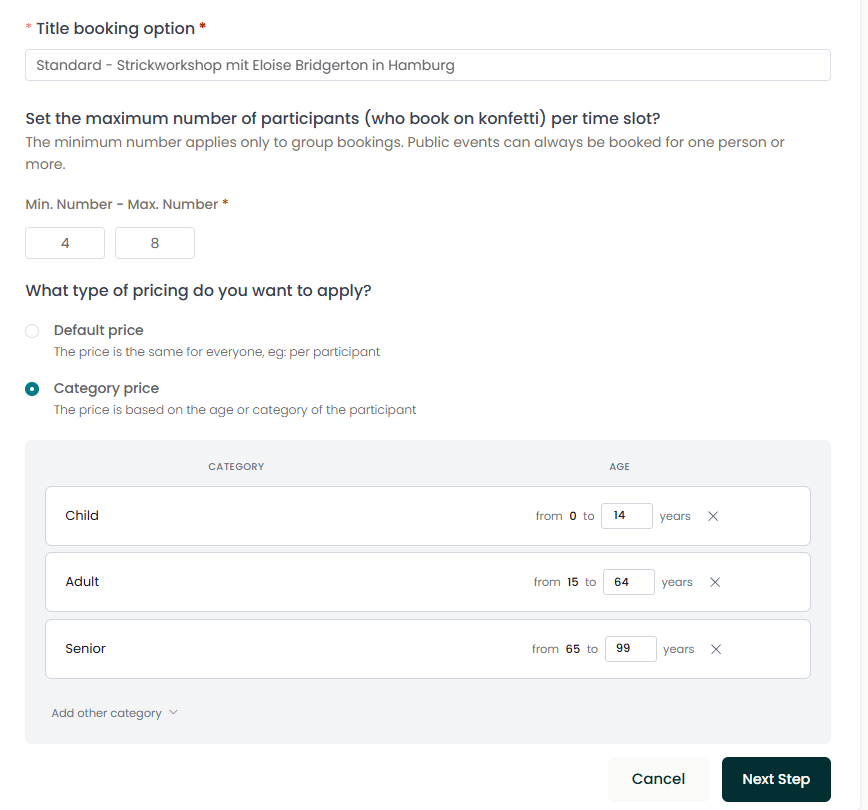
- Go to the next step and define the price for each ticket category.
If you use tiered pricing, you can add your price tiers here as well.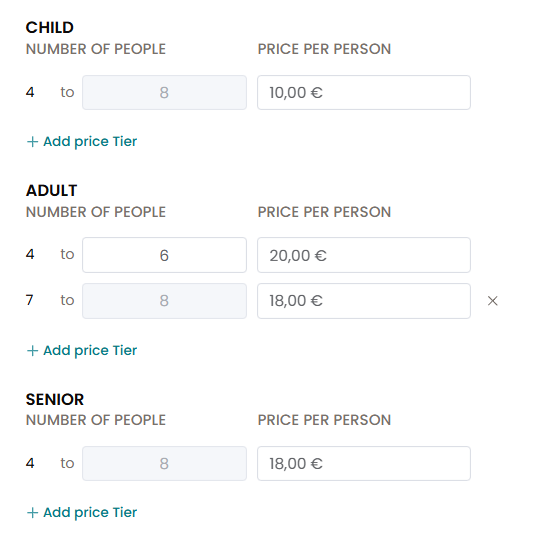
- In the final step, you can add your event dates. All ticket categories are available for each date. If your event is on request, you can skip adding dates and simply save.